
Deposition transcripts, managed inside the firm.
Transcripts, synced video, annotations, designations, exhibits and chronology in one desktop application, with AI on your firm's own provider account.
Everything a deposition needs, in one place.
Built by a litigation support professional around the work as it is actually done: read, mark, designate, cite, print.
Transcript viewer
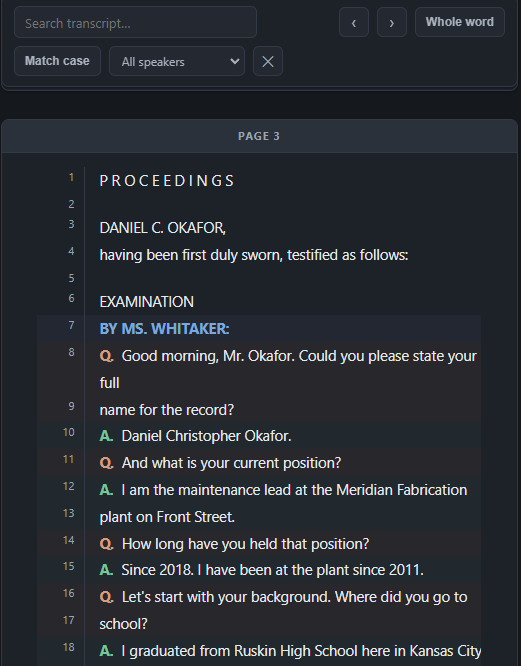
Page and line display with full-text search and click-to-jump navigation. Annotation bars sit beside the line numbers, designation bars beside the text, so a page tells you what has been done to it before you read a word.
Synced video
Video plays beside the transcript. Click any line and the player seeks to that moment, across multi-volume packages. Export designation clips straight from the page and line range.
Annotations and issue codes
Range-based annotations, several per line, each with notes and issue codes. Import the annotations you already have from CSV, with column mapping and duplicate handling, so nothing is retyped.
Designations
Plaintiff, defendant and counter-designations with objection notes. A dock under the transcript lists every designation in page order, each one a click away, on a 400-page transcript as easily as a 40-page one.
Chronology and exhibits
Facts carry page-and-line citations that open the testimony, and exhibit citations that open the exhibit. Grouped by date, filtered by issue, and never lost: deleted facts are recoverable, and every delete is logged.
Printed Transcript, reports, roles
A Printed Transcript with designation marking and annotation bands, filtered by party. Seven reports to PDF and Excel. Four roles from Administrator to Read Only, with a user activity trail per case.
AI that shows its citations.
Deposition summaries in four formats, from narrative to page-line index. Fact extraction into the chronology, where every proposed fact is checked against the testimony it cites and marked if it does not hold. The provider is one setting, made by your administrator for the whole firm.
- Azure OpenAIUnder the Microsoft agreement and retention terms your firm already holds.
- AnthropicDirect API on your firm's own account. Strong on long-document reasoning.
- OpenAI-compatibleOpenAI itself, an enterprise gateway, or an inference server you host.
Runs on your SQL Server. Nothing calls home.
Soltris installs on your workstations and keeps every transcript, annotation, designation and exhibit link in a database on your own SQL Server. No Soltris cloud, no telemetry, no license server. The license is a signed file; a lapse makes the application read-only and never locks anyone out.
Built by someone who does this work.
Soltris was designed and written by a litigation support professional with hands-on experience managing deposition transcripts.
See it on a transcript of your own.
A one-hour demo covers import, annotation, designation, AI summary with verified citations, the chronology, and the Printed Transcript. Bring IT; the questions they will have are the ones we most want to answer.